







The Ultimate Guide To 3D Browser Games (No GPU Required)
Play 3D games in your browser without a dedicated GPU. We tested WebGL titles on budget laptops and ranked the best performers.

Last Updated: March 2026 | By KomliGames Team
3D browser games use WebGL to render real-time 3D graphics — and they run on integrated graphics, meaning you do not need a dedicated GPU or gaming PC to play them.
How 3D Works in Your Browser
WebGL (Web Graphics Library) is the technology behind every 3D browser game you play. It is a JavaScript API that talks directly to your device's GPU — including the integrated graphics chips found in Chromebooks and budget laptops. Game engines like Unity, Godot, and Three.js export directly to WebGL, which is why browser-based 3D games have gotten so good in recent years.
We tested 3D games on a 4-year-old Chromebook with Intel integrated graphics. Every game on our list below ran at a playable frame rate. The trick is that browser-based 3D games are optimized for low-end hardware — developers know their audience is not on gaming rigs.
Best 3D Browser Games on KomliGames
| Game | Genre | 3D Quality | Performance |
|---|---|---|---|
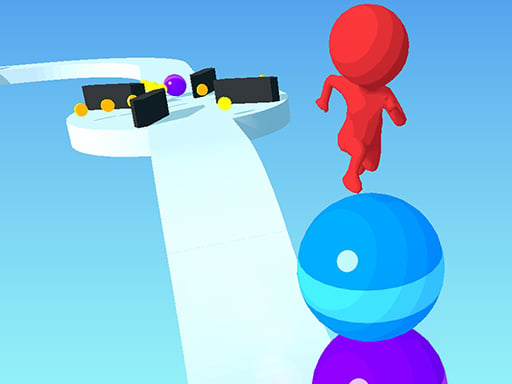
| Ball Runner 3D | Hypercasual | Clean, colorful | Excellent |
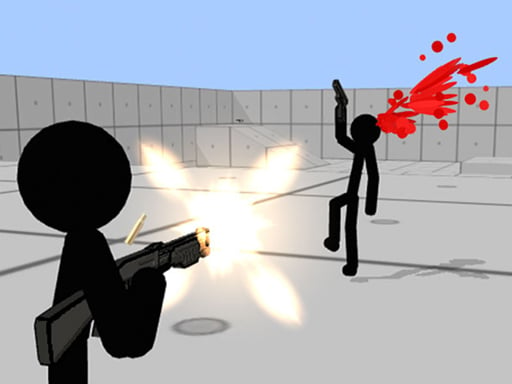
| Stickman Gun Shooter 3D | Shooting | Detailed environments | Good |
| Destroy Godzillas 3D Shooter | Action | Large-scale scenes | Good |
| Johnny Trigger 3D Online | Action | Stylish slow-mo | Excellent |
| Cube Tower Stack 3D | Casual | Minimal, polished | Excellent |
| Color Screw 3D | Puzzle | Colorful, simple | Excellent |
| Mini Golf 3D | Sports | Detailed courses | Good |
| Mini Pool 3D | Sports | Realistic physics | Good |
Performance Tips for 3D Browser Games
If a game is running slowly, try these fixes before blaming your hardware:
- Close extra tabs. Each open tab consumes RAM and CPU. Close anything you do not need.
- Enable hardware acceleration. Go to your browser settings and make sure this is turned on. Chrome: Settings > System > Use hardware acceleration.
- Disable extensions. Ad blockers and privacy extensions can interfere with WebGL rendering. Try disabling them temporarily.
- Update your browser. WebGL performance improves with every browser update. Make sure you are on the latest version.
- Lower the game quality. Some 3D games have in-game settings where you can reduce resolution or effects.
3D Games by Genre
3D Shooters
Stickman Gun Shooter 3D and Destroy Godzillas 3D Shooter prove that browser-based shooters can feel proper. Our team was impressed by the aiming mechanics and level design, especially given the browser constraints.
3D Sports
Mini Golf 3D nails the physics — ball movement feels natural and courses are creatively designed. Mini Pool 3D uses similar physics and is great for a quick session.
3D Casual & Hypercasual
Ball Runner 3D and Cube Tower Stack 3D are the kind of games you open for a quick distraction and end up playing for 45 minutes. Simple controls, satisfying visuals, instant restarts.
Which Browser Is Best for 3D Games?
| Browser | WebGL Support | Performance | Notes |
|---|---|---|---|
| Chrome | Excellent | Fastest | Best overall for 3D games |
| Edge | Excellent | Fast | Uses same engine as Chrome |
| Firefox | Good | Good | Solid alternative |
| Safari | Good | Variable | WebGL 2 support improving |
Frequently Asked Questions
How do 3D browser games work?
They use WebGL, a JavaScript API that renders 3D graphics using your device's hardware acceleration. Modern browsers support it natively.
Do I need a GPU for 3D browser games?
No. Integrated graphics (like Intel UHD or Apple's M-series) handle browser-based 3D games without issues. We tested on budget hardware and everything ran smoothly.
Are 3D browser games free?
Every 3D game on KomliGames is completely free — no downloads, no sign-ups.
Which browser is best for 3D games?
Chrome and Edge deliver the best WebGL performance. Firefox is a solid second choice. Safari is improving but can be slower on some titles.
Why are some 3D browser games laggy?
Usually it is other browser tabs or extensions consuming resources. Close tabs, disable extensions, enable hardware acceleration, and update your browser.
Explore 3D Games
See the full library of 3D games or browse the 3D tag on KomliGames for the latest additions.